How Human Error Leads to Leaked Secrets and Data Breaches
Git commits, hardcoded API keys, and debug logs are common ways developers accidentally expose secrets and sensitive data. This post covers real incidents caused by these mistakes and practical ways to prevent them.
How Human Error Leads to Leaked Secrets and Data Breaches
Common developer mistakes that expose secrets and sensitive data
Despite the headlines about sophisticated cyberattacks and zero-day exploits, many devastating data breaches start with something much simpler: human error. Puaro's security scanners routinely detect sensitive data exposed through everyday mistakes made during development.
These are common slip-ups, not complex attacks requiring advanced technical skills, and they create an open door for attackers. Understanding and addressing these human errors can significantly reduce an organization's breach risk.
The accidental Git commit
It happens to even experienced developers: testing a feature locally with real credentials, then accidentally pushing those secrets to version control when committing code changes.
The dangerous pattern
Risky Code:
// config/dev.js (Mistakenly committed to Git)
module.exports = {
  DATABASE_URL: 'postgres://user:RealPassword123@prod-db.example.com:5432/mydatabase',
  AWS_ACCESS_KEY_ID: 'AKIAIOSFODNN7EXAMPLE',
  AWS_SECRET_ACCESS_KEY: 'wJalrXUtnFEMI/K7MDENG/bPxRfiCYEXAMPLEKEY'
};
Better Approach:
// .gitignore entry:
config/*.js
*.env

// Load in code:
const config = {
  DATABASE_URL: process.env.DATABASE_URL,
  AWS_ACCESS_KEY_ID: process.env.AWS_ACCESS_KEY_ID,
  // ... etc. fetched from environment or secrets manager
};
Once secrets are committed to a repository, even if deleted in a subsequent commit, they remain in the Git history, potentially accessible to anyone with repository access.
Real-world impact
In 2020, a major financial services company exposed API keys through an accidental Git commit. The keys remained in the repository's Git history for over two months before discovery. This oversight potentially exposed thousands of customer records, and the company had to carry out emergency key rotation and a comprehensive security audit.
Hardcoding secrets in source code
Another common mistake is embedding credentials, API keys, or other secrets directly in application code. This pattern is particularly dangerous in mobile apps where decompilation is relatively straightforward.
The dangerous pattern
Risky Code:
// In an Android App source file
public class ApiClient {
    // API key directly in the code - easily found by decompiling the app!
    private static final String API_KEY = "shh_this_is_super_secret_12345";

    public void makeApiCall() {
        // ... code that uses API_KEY ...
    }
}
Better Approach:
// Using Android's secure storage mechanisms
public class ApiClient {
    private String apiKey;

    public ApiClient(Context context) {
        // Fetch at runtime from secure storage
        KeyStore keyStore = KeyStore.getInstance("AndroidKeyStore");
        keyStore.load(null);
        KeyStore.SecretKeyEntry secretKeyEntry = (KeyStore.SecretKeyEntry) keyStore.getEntry("api_key", null);
        this.apiKey = new String(secretKeyEntry.getSecretKey().getEncoded());
    }
}
Real-world impact
A popular fitness app in 2021 was found to have hardcoded AWS credentials in its mobile application code. Once discovered, attackers gained access to an S3 bucket containing user profile photos and activity data for millions of users. The breach was only discovered after user data appeared for sale on underground forums.
Logging sensitive data
During development and debugging, it's tempting to log everything to understand application flow. However, accidentally logging passwords, session tokens, or personal information creates significant security risks.
The dangerous pattern
Risky Code:
# Logging sensitive details during payment processing
try:
    user_payment_info = process_payment(user_id, credit_card_details)
    # OOPS! Logging potentially full credit card details
    logger.info(f"Payment processed successfully for user {user_id}. Details: {user_payment_info}")
except Exception as e:
    # DOUBLE OOPS! Logging sensitive input data on failure
    logger.error(f"Payment failed for user {user_id}. Input: {credit_card_details}. Error: {e}")
Better Approach:
# Safe logging practices
try:
    transaction_id = process_payment(user_id, credit_card_details)
    logger.info(f"Payment processed successfully for user {user_id}. Transaction ID: {transaction_id}")
except Exception as e:
    # Log only the error type and non-sensitive context
    logger.error(f"Payment failed for user {user_id}. Error type: {e.__class__.__name__}", exc_info=True)
Real-world impact
In 2022, a healthcare provider discovered that patient information, including names, addresses, and partial medical records, had been exposed in application logs stored in their Elasticsearch instance. The logs were collected from their patient portal application, which had been logging detailed user information during error conditions for several months.
Building a human-error-resistant security culture
Human mistakes are inevitable, but their impact doesn't have to be catastrophic. By implementing the right tools, processes, and developer education, most of these common errors can be prevented before they lead to a breach.
Best practices to minimize risk
Centralize secrets management
Never store secrets in code or commit them to Git. Use dedicated tools like HashiCorp Vault, AWS Secrets Manager, or Azure Key Vault, which provide secure storage, access control, secret rotation, and audit capabilities.
Automate secrets detection
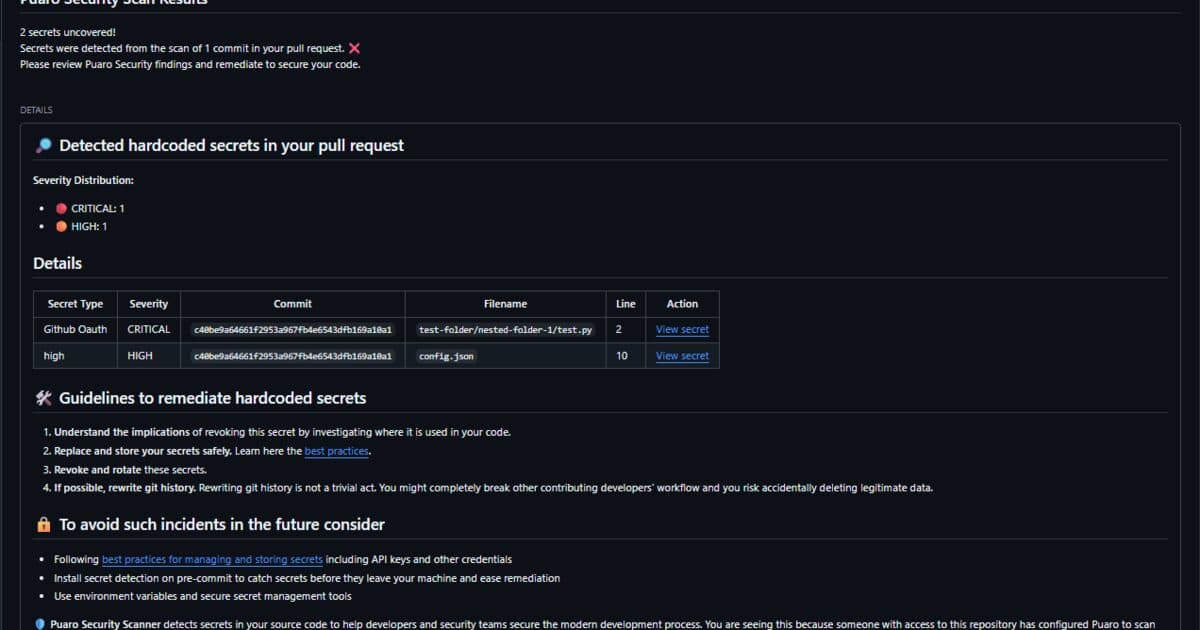
Implement pre-commit hooks that prevent secrets from being committed, and set up CI/CD pipeline scans that fail builds if secrets are detected. Periodic repository scans also help catch secrets already sitting in existing code.
Implement secure logging
Create a clear list of what should never be logged, such as passwords, tokens, and PII. Implement log masking for sensitive fields (for example, "credit_card":"****1234"), and establish appropriate access controls for logging systems.
Continuous education
This includes regular training on secure coding practices, security-focused code reviews, shared post-mortems for security incidents (even near-misses), and recognition for people who report security issues.
Why these measures matter
Stopping breaches before they happen saves millions in recovery costs.
These measures also help meet regulatory requirements for data protection.
They maintain customer confidence in your security practices.
Security automation also frees up developer time for other work.
The stats that matter
The following numbers show how often human error plays a role in security incidents:
12.8M new secrets on GitHub in 2023 GitGuardian's 2024 State of Secrets Sprawl counted 12.8 million new secret occurrences in public commits.
IBM Cost of a Data Breach USD 4.88 million globally in 2024, then USD 4.44 million in 2025. Older "about $4.5 million" lines tracked an earlier year.
Most incidents still start with a mistake Leaked keys are usually a commit or a log, not a novel exploit. Scanning in the pull request is the guardrail that survives a bad day.
Conclusion: security is a team sport
Most data breaches stem from simple human errors that could have been prevented with proper tools and practices, not from sophisticated attacks. Recognizing that and applying the practices described above can reduce an organization's risk of a breach.
Remember: good security depends more on creating an environment where it's harder to make mistakes and easier to catch them when they do happen, than on fancy technology and complex defenses alone.Key action items
- Implement automation. Secret scanning tools can prevent the vast majority of credential exposures.
- Create security guardrails. Make it easy for developers to do the right thing with proper tools and templates.
- Build a security culture. Education and awareness are just as important as technical controls.
- Remember the human factor. Even the best developers make mistakes, so design systems that catch them.
Ready to implement automated secret detection that prevents human error? Contact our experts to learn how Puaro can help your team avoid costly mistakes.
Discipline does not scale
There is a second version of this argument that showed up as its own post and is now merged here. Management hands people LLM-assisted tools that emit hundreds of lines a minute, then acts shocked when a token lands in git. Mandatory training that says "be more perfect" does not survive that workload.
If you give someone a Formula 1 car and tell them to drive 200 mph through a school zone, you do not get to blame only the driver. You look at the road. Scanning in the pull request is the guardrail. Shouting in CI after merge is too late for the copy that already left.
That is why "more discipline" is a weak AppSec strategy when models generate faster than humans can peer-review for secrets. Design the path so a bad day does not become a credential leak. Start on getting started. Compare tools on Why Puaro. Costs are on pricing.